在ObjectStore的基础上,Datafusion重新封装了一层文件的概念,所以在Datafusion中,文件并不单单指磁盘上的一个物理文件,而是在一个存储服务上的逻辑文件对象。
有几个概念需要了解
读相关
- FileMeta:描述了文件的一次读取行为,可以只读取range指定的部分内容来并行执行
pub struct FileMeta {
    /// Path for the file (e.g. URL, filesystem path, etc)
    pub object_meta: ObjectMeta,
    /// An optional file range for a more fine-grained parallel execution
    pub range: Option<FileRange>,
    /// An optional field for user defined per object metadata
    pub extensions: Option<Arc<dyn std::any::Any + Send + Sync>>,
    /// Size hint for the metadata of this file
    pub metadata_size_hint: Option<usize>,
}

#[derive(Debug, Clone, PartialEq, Hash, Eq, PartialOrd, Ord)]
pub struct FileRange {
    /// Range start
    pub start: i64,
    /// Range end
    pub end: i64,
}- FileCompressionType:文件的压缩信息
#[derive(Debug, Clone, Copy, PartialEq, Eq)]
pub struct FileCompressionType {
    variant: CompressionTypeVariant,
}

#[derive(Debug, Clone, Copy, PartialEq, Eq, Hash)]
pub enum CompressionTypeVariant {
    /// Gzip-ed file
    GZIP,
    /// Bzip2-ed file
    BZIP2,
    /// Xz-ed file (liblzma)
    XZ,
    /// Zstd-ed file,
    ZSTD,
    /// Uncompressed file
    UNCOMPRESSED,
}- FileSource:通用的文件行为约束。定义了文件能够提供的能力,Datafusion能够从中获取到读取文件所需要的全部信息
pub trait FileSource: Send + Sync {
    /// Creates a `dyn FileOpener` based on given parameters    fn create_file_opener(
        &self,
        object_store: Arc<dyn ObjectStore>,
        base_config: &FileScanConfig,
        partition: usize,
    ) -> Arc<dyn FileOpener>;
    /// Any
    fn as_any(&self) -> &dyn Any;
    /// Initialize new type with batch size configuration
    fn with_batch_size(&self, batch_size: usize) -> Arc<dyn FileSource>;
    /// Initialize new instance with a new schema
    fn with_schema(&self, schema: SchemaRef) -> Arc<dyn FileSource>;
    /// Initialize new instance with projection information
    fn with_projection(&self, config: &FileScanConfig) -> Arc<dyn FileSource>;
    /// Initialize new instance with projected statistics
    fn with_statistics(&self, statistics: Statistics) -> Arc<dyn FileSource>;
    /// Return execution plan metrics
    fn metrics(&self) -> &ExecutionPlanMetricsSet;
    /// Return projected statistics
    fn statistics(&self) -> Result<Statistics>;
    /// String representation of file source such as "csv", "json", "parquet"
    fn file_type(&self) -> &str;
    /// Format FileType specific information
    fn fmt_extra(&self, _t: DisplayFormatType, _f: &mut Formatter) -> fmt::Result {
        Ok(())
    }

    /// If supported by the [`FileSource`], redistribute files across partitions according to their size.
    /// Allows custom file formats to implement their own repartitioning logic.    ///    /// Provides a default repartitioning behavior, see comments on [`FileGroupPartitioner`] for more detail.
    fn repartitioned(
        &self,
        target_partitions: usize,
        repartition_file_min_size: usize,
        output_ordering: Option<LexOrdering>,
        config: &FileScanConfig,
    ) -> Result<Option<FileScanConfig>> {
        if config.file_compression_type.is_compressed() || config.new_lines_in_values {
            return Ok(None);
        }

        let repartitioned_file_groups_option = FileGroupPartitioner::new()
            .with_target_partitions(target_partitions)
            .with_repartition_file_min_size(repartition_file_min_size)
            .with_preserve_order_within_groups(output_ordering.is_some())
            .repartition_file_groups(&config.file_groups);

        if let Some(repartitioned_file_groups) = repartitioned_file_groups_option {
            let mut source = config.clone();
            source.file_groups = repartitioned_file_groups;
            return Ok(Some(source));
        }
        Ok(None)
    }

    /// Try to push down filters into this FileSource.
    /// See [`ExecutionPlan::try_pushdown_filters`] for more details.    ///    /// [`ExecutionPlan::try_pushdown_filters`]: datafusion_physical_plan::ExecutionPlan::try_pushdown_filters
    fn try_pushdown_filters(
        &self,
        fd: FilterDescription,
        _config: &ConfigOptions,
    ) -> Result<FilterPushdownResult<Arc<dyn FileSource>>> {
        Ok(filter_pushdown_not_supported(fd))
    }
}
文件读取的这部分结构,最终都是通过DataSource这个trait来作为执行计划的一部分。从下面的结构其实也是可以看出,正是DataSource这个trait的约束要求上面的File具有对应的能力
pub trait DataSource: Send + Sync + Debug {
    fn open(
        &self,
        partition: usize,
        context: Arc<TaskContext>,
    ) -> Result<SendableRecordBatchStream>;
    fn as_any(&self) -> &dyn Any;
    /// Format this source for display in explain plans
    fn fmt_as(&self, t: DisplayFormatType, f: &mut Formatter) -> fmt::Result;

    /// Return a copy of this DataSource with a new partitioning scheme
    fn repartitioned(
        &self,
        _target_partitions: usize,
        _repartition_file_min_size: usize,
        _output_ordering: Option<LexOrdering>,
    ) -> Result<Option<Arc<dyn DataSource>>> {
        Ok(None)
    }

    fn output_partitioning(&self) -> Partitioning;
    fn eq_properties(&self) -> EquivalenceProperties;
    fn statistics(&self) -> Result<Statistics>;
    /// Return a copy of this DataSource with a new fetch limit
    fn with_fetch(&self, _limit: Option<usize>) -> Option<Arc<dyn DataSource>>;
    fn fetch(&self) -> Option<usize>;
    fn metrics(&self) -> ExecutionPlanMetricsSet {
        ExecutionPlanMetricsSet::new()
    }
    fn try_swapping_with_projection(
        &self,
        _projection: &ProjectionExec,
    ) -> Result<Option<Arc<dyn ExecutionPlan>>>;
    /// Try to push down filters into this DataSource.
    /// See [`ExecutionPlan::try_pushdown_filters`] for more details.    fn try_pushdown_filters(
        &self,
        fd: FilterDescription,
        _config: &ConfigOptions,
    ) -> Result<FilterPushdownResult<Arc<dyn DataSource>>> {
        Ok(filter_pushdown_not_supported(fd))
    }
}

#[derive(Clone, Debug)]
pub struct DataSourceExec {
    /// The source of the data -- for example, `FileScanConfig` or `MemorySourceConfig`
    data_source: Arc<dyn DataSource>,
    /// Cached plan properties such as sort order
    cache: PlanProperties,
}
写相关
上面是文件读的部分,那么下面就是文件写的部分了。与读部分类似,分为文件本身写能力的约束以及接入执行计划的约束。
- DataSink:桥接FileSink和执行计划
#[async_trait]
pub trait DataSink: DisplayAs + Debug + Send + Sync {
    fn as_any(&self) -> &dyn Any;

    fn metrics(&self) -> Option<MetricsSet> {
        None
    }

    /// Returns the sink schema
    fn schema(&self) -> &SchemaRef;

    async fn write_all(
        &self,
        data: SendableRecordBatchStream,
        context: &Arc<TaskContext>,
    ) -> Result<u64>;
}- DataSinkExec:写数据的算子
#[derive(Clone)]
pub struct DataSinkExec {
    /// Input plan that produces the record batches to be written.
    input: Arc<dyn ExecutionPlan>,
    /// Sink to which to write
    sink: Arc<dyn DataSink>,
    /// Schema describing the structure of the output data.
    count_schema: SchemaRef,
    /// Optional required sort order for output data.
    sort_order: Option<LexRequirement>,
    cache: PlanProperties,
}- FinkSink:文件写能力的约束
#[async_trait]
pub trait FileSink: DataSink {
    /// Retrieves the file sink configuration.
    fn config(&self) -> &FileSinkConfig;


    async fn spawn_writer_tasks_and_join(
        &self,
        context: &Arc<TaskContext>,
        demux_task: SpawnedTask<Result<()>>,
        file_stream_rx: DemuxedStreamReceiver,
        object_store: Arc<dyn ObjectStore>,
    ) -> Result<u64>;

    /// File sink implementation of the [`DataSink::write_all`] method.
    async fn write_all(
        &self,
        data: SendableRecordBatchStream,
        context: &Arc<TaskContext>,
    ) -> Result<u64> {
        let config = self.config();
        let object_store = context
            .runtime_env()
            .object_store(&config.object_store_url)?;
        let (demux_task, file_stream_rx) = start_demuxer_task(config, data, context);
        self.spawn_writer_tasks_and_join(
            context,
            demux_task,
            file_stream_rx,
            object_store,
        )
        .await
    }
}
FileFormat
FileSource和FileSink分别作为文件读和写,使用FileFormat进行统一约束。也就是说对于一种Datafusion中的一种文件格式,要提供读和写的接入。
核心点就是下面trait的create_physical_plan和create_writer_physical_plan两个方法,根据传入的参数,能够获得读取指定文件内容或者写入指定部分数据到文件当中的执行计划,依次接入到整个ExecutionPlan当中。
pub trait FileFormat: Send + Sync + fmt::Debug {
    /// Returns the table provider as [`Any`](std::any::Any) so that it can be    /// downcast to a specific implementation.    fn as_any(&self) -> &dyn Any;

    /// Returns the extension for this FileFormat, e.g. "file.csv" -> csv
    fn get_ext(&self) -> String;

    /// Returns the extension for this FileFormat when compressed, e.g. "file.csv.gz" -> csv
    fn get_ext_with_compression(
        &self,
        _file_compression_type: &FileCompressionType,
    ) -> Result<String>;


    async fn infer_schema(
        &self,
        state: &dyn Session,
        store: &Arc<dyn ObjectStore>,
        objects: &[ObjectMeta],
    ) -> Result<SchemaRef>;


    async fn infer_stats(
        &self,
        state: &dyn Session,
        store: &Arc<dyn ObjectStore>,
        table_schema: SchemaRef,
        object: &ObjectMeta,
    ) -> Result<Statistics>;

    /// Take a list of files and convert it to the appropriate executor
    /// according to this file format.
    async fn create_physical_plan(
        &self,
        state: &dyn Session,
        conf: FileScanConfig,
        filters: Option<&Arc<dyn PhysicalExpr>>,
    ) -> Result<Arc<dyn ExecutionPlan>>;

    /// Take a list of files and the configuration to convert it to the
    /// appropriate writer executor according to this file format.
    async fn create_writer_physical_plan(
        &self,
        _input: Arc<dyn ExecutionPlan>,
        _state: &dyn Session,
        _conf: FileSinkConfig,
        _order_requirements: Option<LexRequirement>,
    ) -> Result<Arc<dyn ExecutionPlan>> {
        not_impl_err!("Writer not implemented for this format")
    }


    fn supports_filters_pushdown(
        &self,
        _file_schema: &Schema,
        _table_schema: &Schema,
        _filters: &[&Expr],
    ) -> Result<FilePushdownSupport> {
        Ok(FilePushdownSupport::NoSupport)
    }

    /// Return the related FileSource such as `CsvSource`, `JsonSource`, etc.
    fn file_source(&self) -> Arc<dyn FileSource>;
}
Csv Format示例
Csv格式比较简单,正好以其作用示例来将整个File部分的结构贯穿起来。
首先是格式本身的结构体,这个结构体倒是没有什么说的,其实就是读写cvs文件的一个控制选项。
#[derive(Debug, Default)]
pub struct CsvFormat {
    options: CsvOptions,
}

pub struct CsvOptions {
    pub delimiter: u8, default = b','
    pub quote: u8, default = b'"'
    pub terminator: Option<u8>, default = None
    pub escape: Option<u8>, default = None
    pub double_quote: Option<bool>, default = None
    pub newlines_in_values: Option<bool>, default = None
    pub compression: CompressionTypeVariant, default = CompressionTypeVariant::UNCOMPRESSED
    pub schema_infer_max_rec: Option<usize>, default = None
    pub date_format: Option<String>, default = None
    pub datetime_format: Option<String>, default = None
    pub timestamp_format: Option<String>, default = None
    pub timestamp_tz_format: Option<String>, default = None
    pub time_format: Option<String>, default = None
    // The output format for Nulls in the CSV writer.
    pub null_value: Option<String>, default = None
    // The input regex for Nulls when loading CSVs.
    pub null_regex: Option<String>, default = None
    pub comment: Option<u8>, default = None
}
然后就是FileFormat这个trait的实现,其他的部分这里不关注,只关注读和写文件的两个方法
#[async_trait]
impl FileFormat for CsvFormat {
    async fn create_physical_plan(
        &self,
        state: &dyn Session,
        conf: FileScanConfig,
        _filters: Option<&Arc<dyn PhysicalExpr>>,
    ) -> Result<Arc<dyn ExecutionPlan>> {
        // 配置好选项
        let has_header = self
            .options
            .has_header
	    .unwrap_or(state.config_options().catalog.has_header);
        let newlines_in_values = self.options.newlines_in_values.unwrap_or(state.config_options().catalog.newlines_in_values);

        let conf_builder = FileScanConfigBuilder::from(conf)
.with_file_compression_type(self.options.compression.into())
            .with_newlines_in_values(newlines_in_values);

		// 创建CvsSource对象
        let source = Arc::new(
            CsvSource::new(has_header, self.options.delimiter, self.options.quote)
                .with_escape(self.options.escape)
                .with_terminator(self.options.terminator)
                .with_comment(self.options.comment),
        );
		// 转为DataSource
        let config = conf_builder.with_source(source).build();
		// 再转为DataSourceExec
        Ok(DataSourceExec::from_data_source(config))
    }

    async fn create_writer_physical_plan(
        &self,
        input: Arc<dyn ExecutionPlan>,
        state: &dyn Session,
        conf: FileSinkConfig,
        order_requirements: Option<LexRequirement>,
    ) -> Result<Arc<dyn ExecutionPlan>> {
        if conf.insert_op != InsertOp::Append {
            return not_impl_err!("Overwrites are not implemented yet for CSV");
        }
        // 配置处理
        let has_header = self
            .options()
            .has_header
            .unwrap_or(state.config_options().catalog.has_header);
        let newlines_in_values = self
            .options()
            .newlines_in_values
            .unwrap_or(state.config_options().catalog.newlines_in_values);

        let options = self
            .options()
            .clone()
            .with_has_header(has_header)
            .with_newlines_in_values(newlines_in_values);

        let writer_options = CsvWriterOptions::try_from(&options)?;
		// 创建CsvSink对象,DataSink的实现类
        let sink = Arc::new(CsvSink::new(conf, writer_options));
		// 创建DataSinkExec算子
        Ok(Arc::new(DataSinkExec::new(input, sink, order_requirements)) as _)
    }

}
Csv Format读相关
和前面介绍File整体的抽象层类似,这里关于cvs的具体实现也分为读和写两部分。首先介绍的就是读部分。
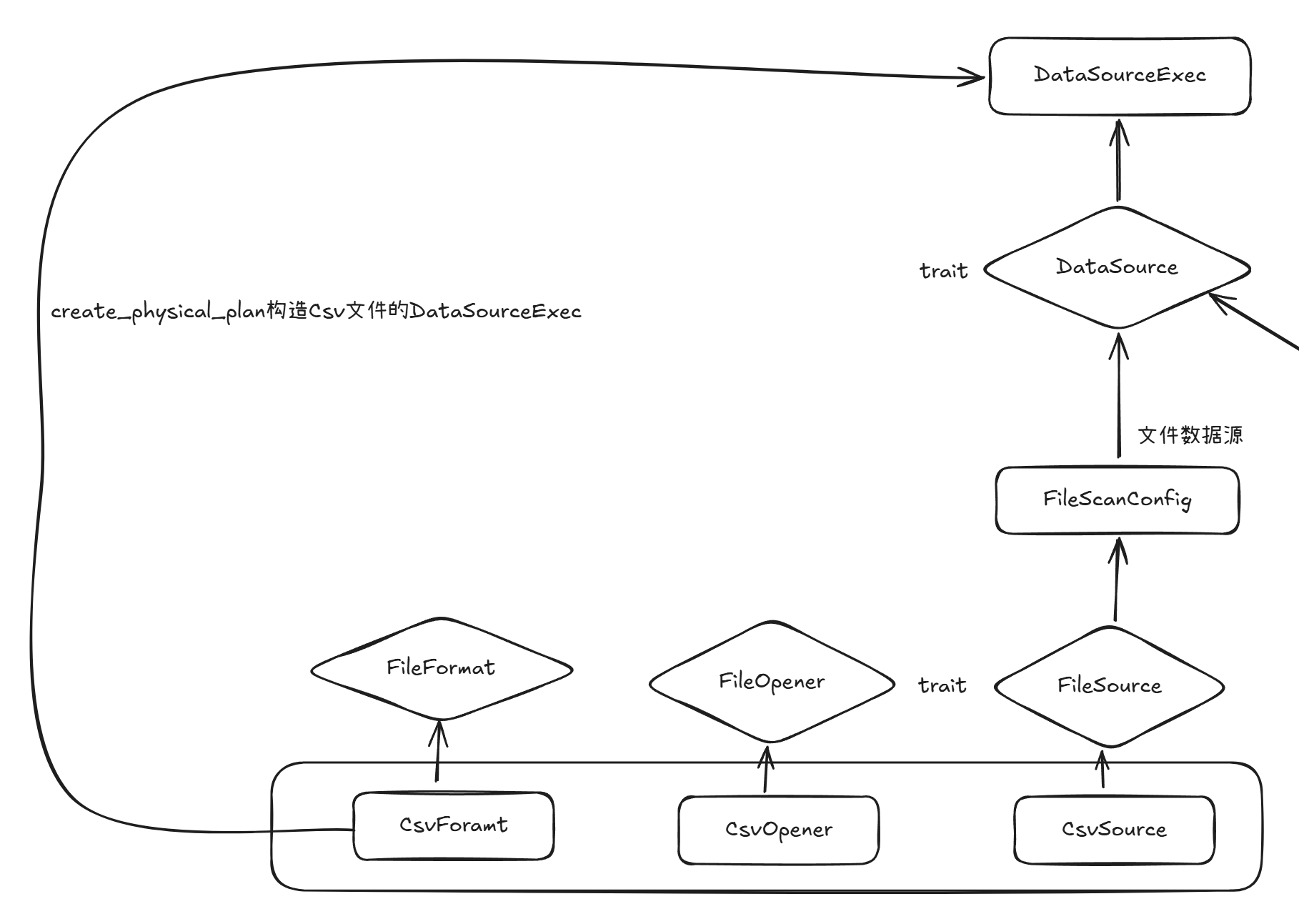
读取Cvs format文件,则需要由CsvFormat来构造出DataSourceExec算子作为ExecutionPlan执行计划树当中的数据来源。
DataSource这个trait在Datafusion中是按照性质分类,目前就只有文件数据源和内存数据源两种类型。这里我们讨论的是文件,那么其实就是所有的文件都属于文件数据源这一类。所以文件格式之间的差别,是从FileSource这个trait的实现开始的。在DataSource这一层是统一的。
来看FileSource的csv实现。
#[derive(Debug, Clone, Default)]
pub struct CsvSource {
    batch_size: Option<usize>,
    file_schema: Option<SchemaRef>,
    file_projection: Option<Vec<usize>>,
    pub(crate) has_header: bool,
    delimiter: u8,
    quote: u8,
    terminator: Option<u8>,
    escape: Option<u8>,
    comment: Option<u8>,
    metrics: ExecutionPlanMetricsSet,
    projected_statistics: Option<Statistics>,
}
FileSource trait最关键的一个方法就是create_file_opener,会创建一个用来读取文件数据的句柄,其他的方法都是构造Source或者读取Source信息的方法,直接忽略掉
impl FileSource for CsvSource {
    fn create_file_opener(
        &self,
        object_store: Arc<dyn ObjectStore>,
        base_config: &FileScanConfig,
        _partition: usize,
    ) -> Arc<dyn FileOpener> {
        Arc::new(CsvOpener {
            config: Arc::new(self.clone()),
            file_compression_type: base_config.file_compression_type,
            object_store,
        })
    }
}CsvOpener这个结构体又实现了FileOpener这个trait,返回一个stream对象,将文件的数据统一按照arrow内存格式返回。
impl FileOpener for CsvOpener {
	    fn open(&self, file_meta: FileMeta) -> Result<FileOpenFuture> { ...}
}
csv文件的具体读取实现就在FileOpener这个trait的实现当中了,整体的流程如下。
Csv Format写相关
写相关就是构造了CsvSink对象,然后封装为DataSinkExec作为执行计划数据落盘的算子。
与读实现FileSource trait相对,写实现了FileSink trait
impl FileSink for CsvSink {
    fn config(&self) -> &FileSinkConfig {
        &self.config
    }

    async fn spawn_writer_tasks_and_join(
        &self,
        context: &Arc<TaskContext>,
        demux_task: SpawnedTask<Result<()>>,
        file_stream_rx: DemuxedStreamReceiver,
        object_store: Arc<dyn ObjectStore>,
    ) -> Result<u64> {
        let builder = self.writer_options.writer_options.clone();
        let header = builder.header();
        let serializer = Arc::new(
            CsvSerializer::new()
                .with_builder(builder)
                .with_header(header),
        ) as _;
        spawn_writer_tasks_and_join(
            context,
            serializer,
            self.writer_options.compression.into(),
            object_store,
            demux_task,
            file_stream_rx,
        )
        .await
    }
}
用于桥接数据源的还有一个DataSink的trait
#[async_trait]
impl DataSink for CsvSink {
    fn as_any(&self) -> &dyn Any {
        self
    }

    fn schema(&self) -> &SchemaRef {
        self.config.output_schema()
    }

    async fn write_all(
        &self,
        data: SendableRecordBatchStream,
        context: &Arc<TaskContext>,
    ) -> Result<u64> {
        FileSink::write_all(self, data, context).await
    }
}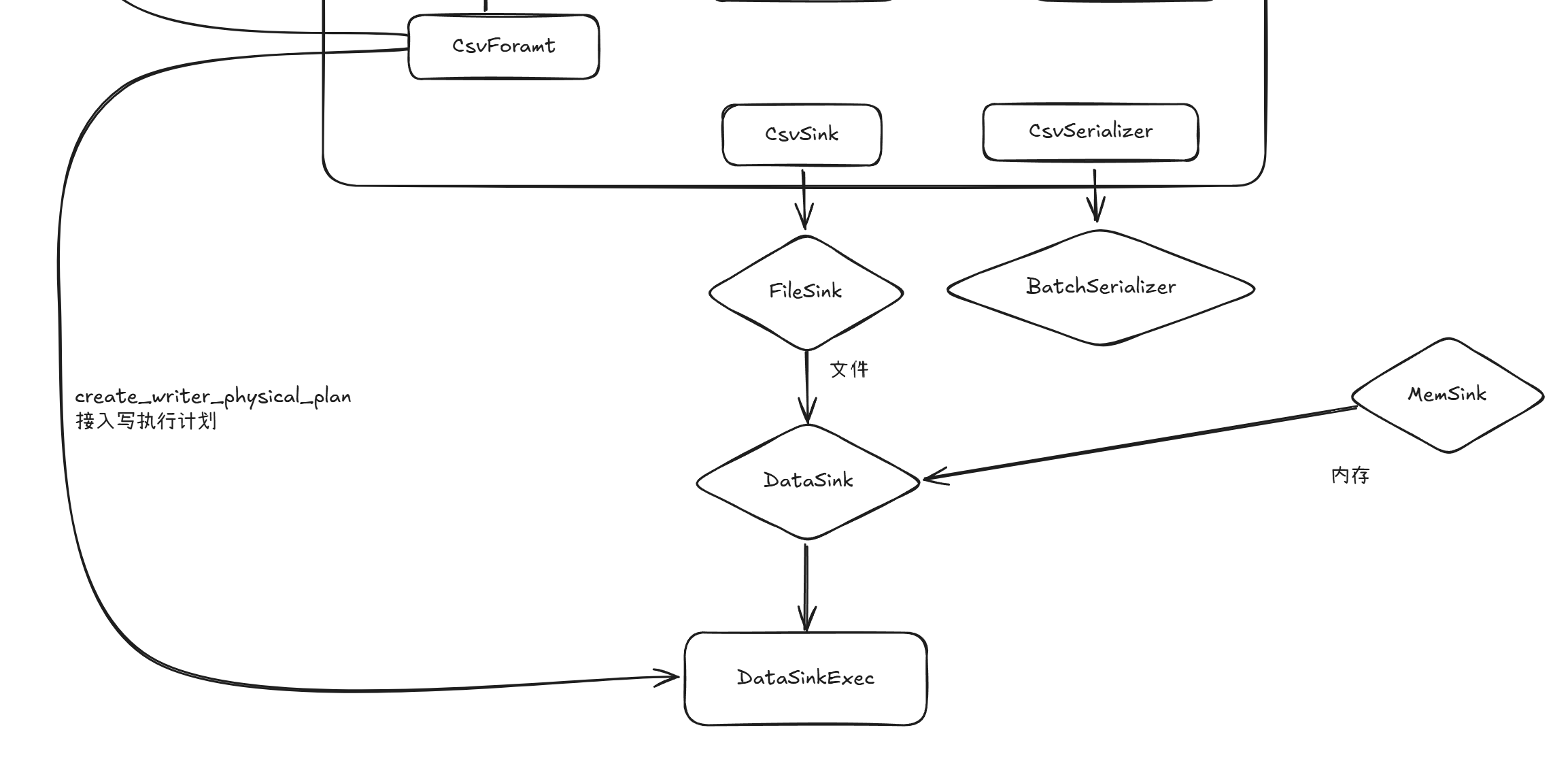
相较与读,写的封装抽象层级更高,不像读操作由每个文件格式实现FileOpener可以各自实现读逻辑。写逻辑被高度抽象,所有的文件格式写流程都一致,只是通过FileSinkConfig中的配置选项来控制写流程。
所以每个文件格式也通过设置FileSinkConfig里的配置项来间接控制写流程,就是FileSink的config方法,就是上在create_writer_physical_plan方法参数就可以看到写文件的控制选项就是由上层传递的,因此可以文件的写流程可以由上层逻辑自由控制。